 5 key takeaways
免費 · 瀏覽器擴充功能
快速掌握長篇文章
提問
總結此頁面並列出重點。
獲得
在您閱讀的頁面旁提供簡短摘要與實用的後續步驟。
Everything Caiioo can do — Your Pebble companion, 11 AI providers and Caiioo Router, Code Mode and 300+ Python packages, native files and Computer Use, Slate media annotation, and Private Constellation.
讀取網頁、將潛在客戶新增至試算表,或修改資料夾中的檔案。
免費 · 瀏覽器擴充功能
提問
總結此頁面並列出重點。
獲得
在您閱讀的頁面旁提供簡短摘要與實用的後續步驟。
專業版 · 已連線應用程式
提問
閱讀這些諮詢郵件,告訴我需要新增哪些資料列,並等待我審核後再更新我的潛在客戶試算表。
獲得
在你審核完建議的資料列後,新的潛在客戶將被輸入至你的 Google Sheet 中。
桌面版 · 已連線的資料夾
提問
讀取 launch-brief.md,精簡摘要,並儲存修改後的副本。保留原檔。
獲得
修改後的 Markdown 檔案已儲存至您連線的資料夾中,隨時可供檢閱。
A complete reference of every shipped Caiioo capability, with direct links to the User Guide pages where each workflow is documented in depth.
At the top of your conversation list sits Your Pebble (named Hugo by default, renameable anytime) — a pinned companion conversation that knows your connected accounts, connectors, installed apps, modes, and scheduled tasks. Open the Pebble Notebook from the header to track your goals and open loops, review up to 30 days of recent conversations on a schedule or on demand, and ask Your Pebble to create, configure, or message other threads for you.
Connect 500+ cloud and local models across 11 providers: OpenRouter, Anthropic Claude, OpenAI GPT (API key or ChatGPT account sign-in), Google Gemini, xAI Grok (API key or Grok account sign-in), CometAPI, Poe, and local or network servers running Ollama, vLLM, Unsloth, or MLX. Pick Caiioo Router in the model picker to balance Cost ↔ Intelligence and Anti-hallucination with two live sliders, and set per-model reasoning Effort (Auto, Off, Low … Max) right in the composer.
With Code Mode on (the default on every plan), the assistant writes a short JavaScript or Python script that chains multiple tool calls in a single step while still honoring every per-tool approval. On desktop and the Chrome/Edge extension, each conversation also gets an isolated Python runtime with 300+ verified packages (NumPy, pandas, SciPy, scikit-learn, matplotlib, Pillow, PyMuPDF, BeautifulSoup, SQLite, and more) and renders charts inline in the chat.
Caiioo ships with 54+ built-in tools for web browsing, cited web search, Google Workspace (Gmail, Drive, Calendar, Docs with multi-tab support, Sheets, Slides), Microsoft 365, GitHub, YouTube creator actions, SQLite, multi-model sub-agents, and image/video/music generation. Connect 55+ one-click MCP servers or custom HTTP/SSE and stdio MCP tools, managed in Settings > Connectors.
Point Caiioo at folders on your Mac, Windows, or Linux machine and it reads, searches, and edits your files in place — nothing is copied into a second store. On desktop, run sandboxed shell commands with background job monitoring and per-command approval, and query a real Language Server (LSP) for definitions, references, hover types, and compiler diagnostics.
On macOS, Windows, and Linux, Caiioo can see your screen, move the cursor, click, type, and operate native desktop applications alongside full browser automation — always under your supervision, with coordinate safety guards and approval controls on every action.
Slate combines a code editor, rich-text and DOCX/XLSX redline surface, paginated CSV visual table view, interactive HTML preview (with cdnjs libraries like Three.js and D3), SVG live preview, LaTeX math typesetting, and persistent PDF markup. Use Annotate & send to paint numbered regions on images, mark video frames, or highlight audio timestamp ranges and send them straight into your conversation.
Work with Caiioo directly inside Microsoft Word. Attach one or more open .docx documents to your conversation so the assistant can read formatting, styles, tables cell by cell, headers, footers, and footnotes, and write tracked changes and comments directly into Word for native review.
Unify Google Calendar, Microsoft 365 / Outlook, Apple Calendar, Apple Reminders, Google Tasks, and Microsoft To Do. The Upcoming view gives you a daily busyness strip, Overdue and Anytime / No Deadline sections, overlap detection, In 15m / Happening now badges, separate Primary Calendar / Reminders / Tasks defaults, and one-click Join buttons for Google Meet, Microsoft Teams, and Zoom.
With AES-256-GCM Private Sync enabled, your signed-in devices form your Private Constellation. Pick any conversation’s host device from the composer, send a prompt from your phone while the task runs on your Mac with the Mac’s folders and local models, watch the answer stream live on both screens, or let your desktop automatically finish a turn if your phone locks mid-task.
Switch between specialized AI modes (with automatic fork-on-edit so your customizations never get overwritten), invoke reusable Skills that can bundle executable Python, SQL, JS/TS, or Bash scripts, and package modes, skills, variables, cards, views, and workflows into Personal Apps or install community packages from the Community Hub.
Dictate with on-device Whisper, WhisperKit (iOS), whisper.cpp / Moonshine (Android), ElevenLabs Scribe, or Cartesia Ink. Listen with local Kokoro Neural TTS, steerable OpenAI gpt-4o-mini-tts, ElevenLabs v3 Conversational, Cartesia Sonic 3.5, Gemini, or Resemble.ai. Attach audio recordings for multimodal models or the Hearing tool, and use system-wide push-to-talk dictation across macOS, Windows, and Linux.
Conversations and keys stay on your device. Enforce No-Training, Zero Data Retention, and regional rules in Trust Boundary; scrub PII and HIPAA Safe Harbor identifiers on-device with the Pseudonymizer; store API secrets in the Blind Credential Vault as [credential: Name] so the LLM never sees raw tokens; and click the Where this came from fingerprint on any reply to inspect its exact account, folder, and model provenance.
Run Caiioo as a Chrome, Safari, or Edge extension, a native Swift app on macOS and iOS, a native Kotlin app on Android, or a desktop app on Windows and Linux — or reach your home desktop from any browser over the end-to-end encrypted Private Relay at relay.caiioo.ai/app.
Drive agents, threads, attachments, MCP servers, scheduled triggers, HMAC-signed webhooks, and DAG workflows programmatically over the local REST API (localhost:3847/v1), or connect WhatsApp Business, Telegram, iMessage, Signal, Messenger, Viber, and Beeper through the Messaging Gateway with Auto, Chime In, and Chat coaching modes.
An on-device multilingual-e5 embedding engine powers both Personal Intuition (associative memory across every conversation you have ever had, indexed locally and synced encrypted across devices) and the ~10ms Instant Tool Chooser on every plan.
Recent architectural additions spanning local-first memory, multi-model routing, sandboxed code execution, and peer-to-peer device orchestration.
Meet Hugo, your pinned AI companion. Open the Pebble Notebook to inspect goals, open loops, scheduled tasks, and connected tools, or ask Your Pebble to spin up and message other threads.
Tune Cost ↔ Intelligence and Anti-hallucination sliders for automatic model routing, set per-model Reasoning Effort (Auto, Off, Low to Max), or sign in with your ChatGPT or Grok account.
Chain multiple tools in a single code_run script with loops and conditionals, or run sandboxed Python with NumPy, Pandas, SciPy, SymPy, and Matplotlib.
Pick any device as the Conversation host in the composer. Message from your phone while your Mac runs the tools, connected folders, and local models — with automatic desktop handoff when you lock your phone.
Run Caiioo directly inside Microsoft Word Online and Desktop to redline clauses with tracked changes, rewrite sections while preserving styles, and populate tables.
Reference API keys and passwords via [credential: Name] so secrets are injected at execution time without entering model context, and verify sources with Where This Came From.


在對話中途隨時切換 Claude、GPT、Gemini、Grok、Llama、Mistral 和 Perplexity。您的偏好與上下文會自動延續——拒絕供應商鎖定。新模型在發佈後數小時內即可使用。
設計初衷即為真正的隱私與安全。 對話、設定和個人化資料皆儲存在本地。當對話產生關於您和工作方式的洞察時,這些資料屬於您——儲存在您的裝置上,可隨時用於任何 AI 模型。沒有個人化資料鎖定。數據保留政策標示清晰,由您決定——大多數負責任的提供商透過 API 提供零數據保留,現在您可以輕鬆使用這些服務。


Caiioo 可直接連線至 Google Workspace 與 Microsoft 365。搜尋並摘要 Gmail 或 Outlook 郵件對話串、尋找 Google 雲端硬碟或 OneDrive 中的檔案、讀寫 Docs 或透過 Caiioo for Word 追蹤修訂編輯 Word 文件、分析 Sheets 與 Excel 活頁簿,以及管理 Google、Outlook 和 Apple 日曆活動——一切只需透過與任何 AI 模型的自然對話即可完成。
其他 AI 應用程式會為了節省成本而悄悄截斷您的上下文。在 Caiioo 中,您添加的每一條資訊都會被 AI 考慮——直到模型達到其完整能力上限前都不會進行摘要。結果是:更注重細節、更少的幻覺以及更少的遺忘。智慧設計在不損失任何資訊的情況下降低您的成本。
一個不斷成長的工具平台,提供強大的組合方式:從試算表到個人化郵件、從照片到 Slate 中的插畫故事、從網路研究到精鍊的初稿、從知識庫到即時解答。新功能持續增加——組合無限可能。
停止將 Token 和 AI 算力浪費在廣告內容上。Caiioo 內建的廣告攔截功能會在廣告到達 AI 之前將其移除,讓對話集中在重要的事情上。需要包含廣告?隨時可以關閉此功能。
只需告訴 Caiioo 「幫我建立一個...的代理」,它就會為您構建一個——這是一個具有專屬系統提示詞、首選工具和個人化上下文變數的自定義模式。您可以自行調整或持續引導 AI 進行迭代。結果是:可重複使用的代理能以更高的準確度產生持續優質的結果。
建立具有獨特個性、工具和上下文的專業 AI 代理。無論是支援代理、寫作教練還是程式碼審查員——每一位都針對其任務進行了優化。
將有效的提示詞模式儲存為可重複使用的技能。只需點擊一下即可重現經過驗證的工作流,無需重新編寫提示詞。
教導您的代理認識特定的網站和應用程式。Caiioo 會記住如何操作您的工具,讓 AI 在每次互動中變得更聰明。
定義動態參數——如您的姓名、專案細節、客戶資訊——並自動注入每個提示詞中。同一個代理無需手動編輯即可適應不同情境。
Every surface in Caiioo runs locally on your device — from the two-row composer and 11-provider model router to the ~10ms on-device tool chooser and skills library.
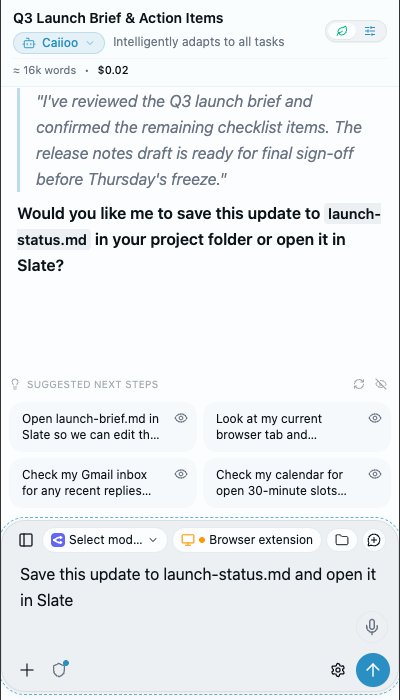
Live reasoning, structured response, suggested next steps, and two-row composer with Browser, Folders, and Skills pills.
Connect OpenRouter, Google AI, CometAPI, xAI (Grok), Anthropic, Poe, OpenAI, Ollama, Unsloth, vLLM, and MLX.
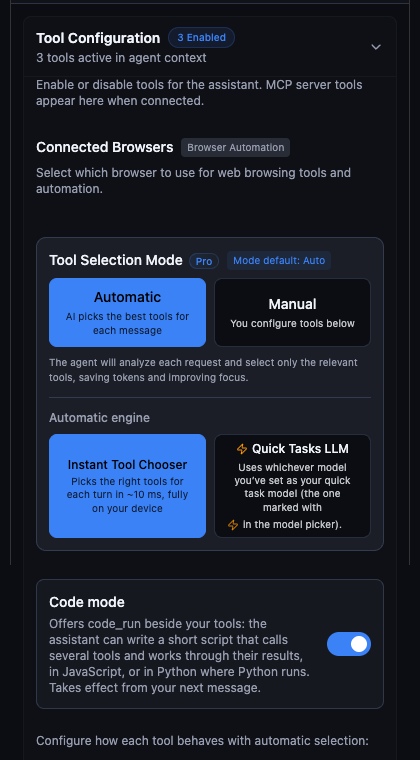
~10ms on-device semantic tool selection alongside Code Mode (code_run) and 300+ Python packages.
Searchable prompt templates and bundled scripts with mode badges and bulk organization.
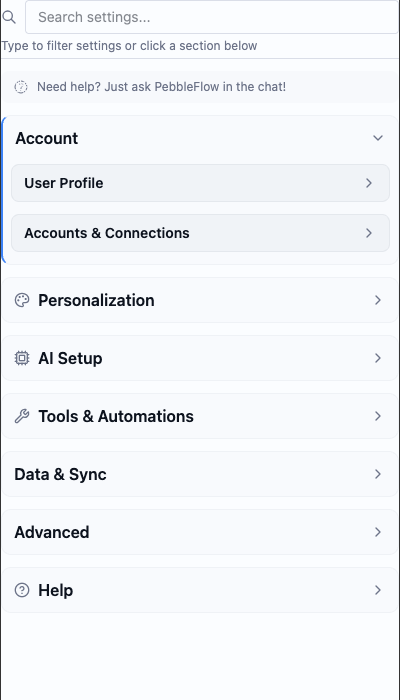
Kokoro Neural TTS, Whisper STT, steerable OpenAI voice instructions, ElevenLabs v3, and direct audio hearing.
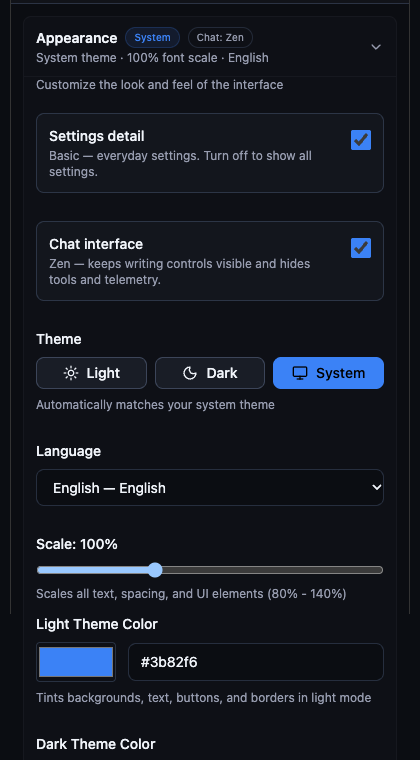
Switch between distraction-free Zen Mode and full-telemetry Studio Mode with custom theme tints and scaling.
Slate is where human and AI work side by side. Co-write documents with redline tracked changes, review suggested diffs on code, JSON, CSV, and HTML before applying, inspect 100×50 CSV tables, mark up PDFs, or use Annotate & Send to drop numbered region notes on images, video frames, and audio timestamp ranges.
透過 OCR 處理 PDF,解析帶有修訂追蹤與註解的 Word 文件,並從試算表中擷取數據。
讓 AI 檢查您的寫作並提供建議,您可以透明地查看並接受修改。處理 Word 文件中的紅線修訂與註解,甚至能建議回應式編輯。
支援任何程式語言的完整語法高亮。在 AI 幫助下編寫技術文件、README 檔案或技術規格書。
建立網站與網頁程式原型並即時編輯。預覽 HTML 並根據 AI 建議進行迭代。
Unified workspace controls — switch between Explore, Edit, and Code, lock artifacts against edits, or expand full screen.
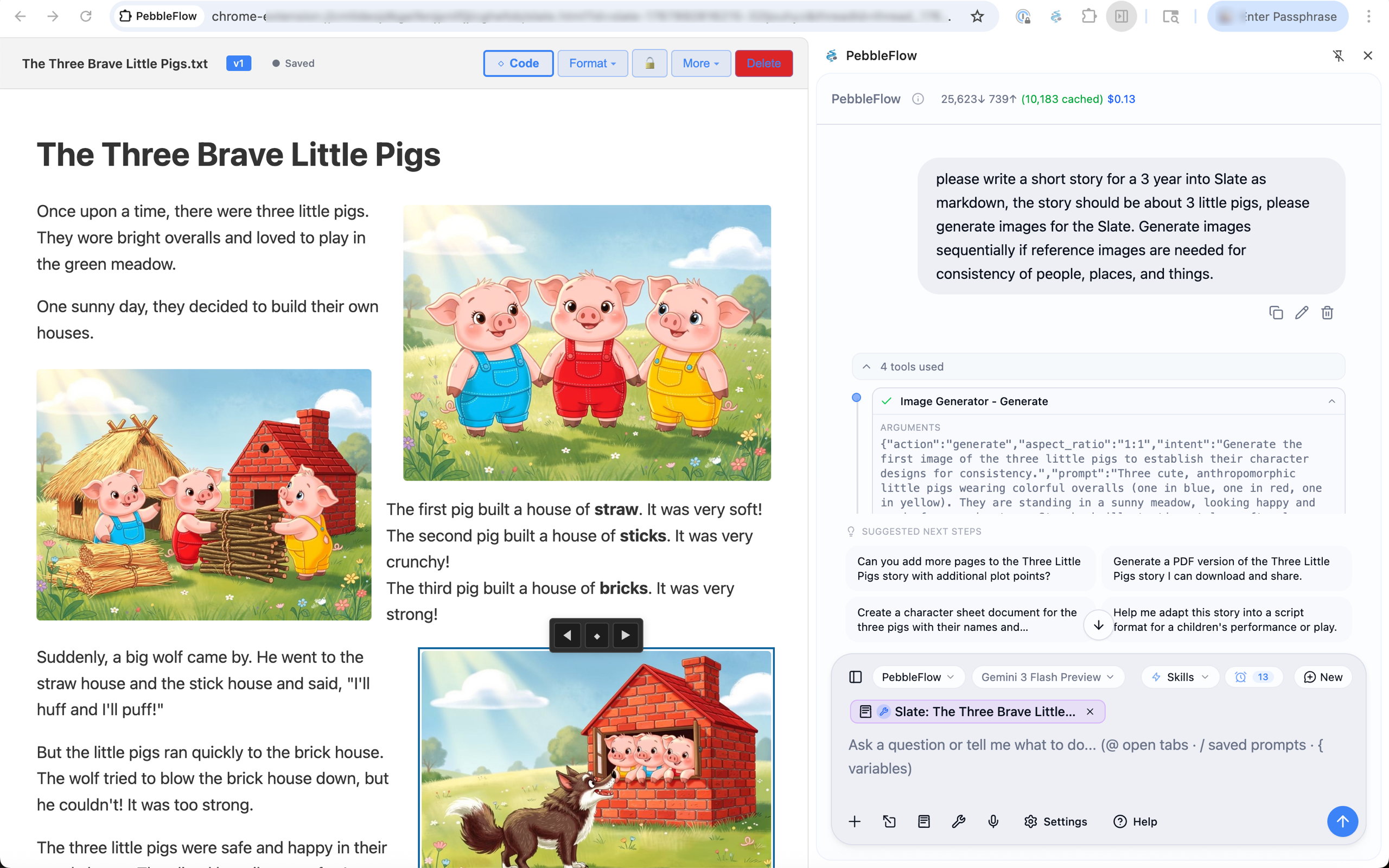
Interactive WebGL and HTML presentations run directly inside Slate
Your complete view of what's ahead — work and personal calendars, reminders, and tasks from Google Workspace, Microsoft 365 / Outlook, Apple Calendar & Reminders, and Caiioo. Browse the multi-day Upcoming view with a daily busyness strip, see Overdue and Anytime / No Deadline tasks, and join video calls in one click.
Real prompts that showcase tool interoperability. Each example shows what you'd type and what the AI does behind the scenes. Always have a quick reference to benchmarking scores on the latest models that you can switch to at any time!.
Boost productivity with AI that integrates with your professional tools
“Summarize this week's sales emails and update the pipeline spreadsheet with any new leads”
What happens: Reads your Gmail inbox filtering for sales-related threads, extracts key information (company names, contact details, deal sizes), then opens your Google Sheets pipeline and adds new rows with the extracted data. You get a summary of what was added.
“Find a 30-minute slot this week for a team sync and draft the calendar invite”
What happens: Analyzes your Google Calendar for availability, identifies free slots during business hours, suggests optimal times, and drafts a calendar event with a professional description. One click to send.
“Research our competitor's product and write a competitive analysis”
What happens: Uses Perplexity deep research to find recent news, product pages, and analyst coverage. Visits competitor websites to gather screenshots and pricing. Creates a comprehensive analysis document in Slate with key findings and strategic implications.
“Turn my meeting notes into a polished document and share it with the team”
What happens: Takes your rough notes (from Slate, a file, or pasted text), structures them into a professional document with sections, action items, and key decisions. Creates a Google Doc and shares it with specified team members.
“Translate this training slide deck to Tagalog matching my tone and style, and identify any unintended cultural references”
What happens: Analyzes your existing documents to learn your communication style and tone. Translates the slide content to Tagalog while preserving that voice. Researches cultural context to flag idioms, examples, or imagery that may not resonate—or could unintentionally offend—in Filipino culture, suggesting culturally appropriate alternatives.
“Review this collaborative Google Doc with all the suggested edits and comments. Summarize the key outstanding issues and help me resolve stakeholders' questions and concerns, researching if necessary.”
What happens: Opens the Google Doc and reads through all content, suggested edits, and comment threads. Identifies patterns in feedback, groups related concerns, and flags unresolved discussions. For technical or factual questions from stakeholders, uses Perplexity to research answers. Produces a prioritized summary with suggested responses you can paste directly into comment replies.
“Summarize the threads on this Slack page and help me understand what everyone is talking about. Get me up to speed.”
What happens: Reads the visible Slack threads in your browser, identifies the key topics and participants, and summarizes each conversation thread. Highlights decisions made, action items assigned, questions still pending, and any tensions or blockers mentioned. Gives you a quick briefing so you can jump into the conversation informed.
“Help me understand how to use this new SaaS app that procurement bought. I can't figure out how to use it.”
What happens: Takes screenshots of the app interface you're looking at, identifies the product, and searches for official documentation, tutorials, and user guides. Walks you through the UI elements visible on screen, explains what each section does, and answers your specific questions about how to accomplish tasks—like having a patient coworker show you the ropes.
“Can you review all of this API documentation for this SaaS app and create a condensed developer guide on how to implement the integration?”
What happens: Navigates through the API documentation pages, reads authentication flows, endpoint references, and example code. Distills the essential information into a focused implementation guide—covering auth setup, key endpoints you'll actually use, common patterns, error handling, and gotchas. Saves the guide to Slate as a living document you can reference and update as you build.
Personal tasks made effortless with AI that understands context
“Help me find a replacement for this shirt [uploads photo]”
What happens: Analyzes your uploaded image to identify the shirt style, color, pattern, and fabric. Searches multiple retailers, opens product pages, compares prices and reviews. Returns a curated list with links—all tabs grouped for easy browsing or cleanup.
“What can I make for dinner with chicken, rice, and whatever vegetables are in season?”
What happens: Searches for seasonal vegetables in your region, finds recipes matching your ingredients, checks nutritional info, and presents options with cooking times. Saves your favorite recipe to Slate for future reference.
“Plan a long weekend trip to somewhere warm in March under $1500”
What happens: Researches destinations with good March weather, compares flight prices from your nearest airports, finds highly-rated hotels within budget, and creates an itinerary. Saves everything to a Slate document you can edit and share.
“My dad's birthday is next week—he likes woodworking and jazz. Gift ideas under $100?”
What happens: Searches for highly-rated gifts in those categories, checks current prices and availability, reads reviews, and presents a ranked list with pros/cons. Opens product pages in grouped tabs so you can browse and buy easily.
“Are raisins okay for dogs? Please research and cite sources to credible articles so I can verify. Then save a list of common toxic foods to my notes so I don't forget.”
What happens: Uses Perplexity deep research to find veterinary sources, academic studies, and trusted pet health organizations. Returns a clear answer with inline citations linking to the original sources—ASPCA, veterinary journals, poison control databases—so you can verify the information yourself. Then compiles a quick-reference list of common toxic foods for dogs and saves it to Apple Notes for easy access later.
“Does my health insurance cover physical therapy? I need to understand my coverage before booking an appointment.”
What happens: First uses Perplexity to research how insurance typically handles PT coverage—common limits, pre-authorization requirements, in-network vs out-of-network rules. Then navigates to your insurance portal (you're already logged in via saved session), finds your specific plan details, checks your remaining deductible, and summarizes your actual coverage limits and any steps needed before your first visit.
Seamlessly coordinate when life and work collide
“My partner asked when I can go to the mountains with them, but I have a weekend meeting coming up and several things to finish. Check all my calendars, find a few available times I can text them, then block those off so I don't get double-booked.”
What happens: Queries both your work and personal calendars (Google, Apple) to understand your full schedule. Identifies conflicts and commitments across all sources. Finds windows that work around your obligations, formats them nicely for texting, and creates placeholder events to protect your availability.
“I need to schedule a dentist appointment—they're only open weekdays 9-5. When am I actually free for an hour?”
What happens: Checks your work calendar for meetings, your personal calendar for commitments, and finds genuine gaps during business hours. Accounts for commute time and buffer between meetings. Presents options ranked by convenience.
“My kid's school play is Thursday at 2pm. Make sure I don't schedule anything that conflicts and remind me to leave by 1:30.”
What happens: Creates a blocking event on your work calendar, sets up a Caiioo reminder for departure time with desktop notification, and can even draft an out-of-office message for that window if needed.
“I'm taking PTO next Friday through the following Wednesday. Block it everywhere.”
What happens: Creates all-day events across your work and personal calendars, marks you as unavailable, accounts for time zones, and adds reminders to prep handoffs before you leave.
Bring ideas to life with AI-powered creative tools
“Generate a logo concept for my coffee shop called 'Morning Ritual'”
What happens: Discusses your vision, style preferences, and brand personality. Generates multiple logo concepts using FLUX or Gemini image generation. Iterates based on your feedback until you have something perfect. Saves finals to Google Drive.
“Help me write a blog post about sustainable living and optimize it for SEO”
What happens: Researches trending topics in sustainability, analyzes top-ranking articles for keyword patterns, drafts a comprehensive post in Slate with proper headings and meta descriptions. Export when ready to publish.
“Design a mood board for my living room renovation [uploads current photo]”
What happens: Analyzes your current space, researches interior design trends matching your style, generates concept images showing potential looks, and compiles everything into a visual presentation in Slate with product links.
“Write a script for a 60-second product video for my Etsy shop”
What happens: Visits your Etsy shop to understand your products and brand voice, researches effective short-form video scripts, writes multiple versions with shot suggestions, and saves to Slate for easy editing.
Deep dives powered by multiple AI models and comprehensive search
“Explain quantum computing to me like I'm a software developer, with code examples”
What happens: Uses Perplexity academic search for foundational concepts, finds practical tutorials, generates code examples in Python using Qiskit, and creates an interactive learning document in Slate you can experiment with.
“Analyze this company's financials and compare to industry benchmarks [provides ticker]”
What happens: Pulls financial data from SEC filings and financial sites, calculates key ratios, researches industry averages, and creates a detailed analysis in Google Sheets with charts. Adds commentary on strengths and concerns.
“Research the pros and cons of forming an LLC vs S-Corp for my consulting business”
What happens: Uses Perplexity to find current tax implications, legal requirements, and expert opinions. Creates a comparison table with your specific situation in mind, noting state-specific considerations. Saves research to Slate for reference.
“Help me debug this code and explain what's wrong [pastes code]”
What happens: Analyzes your code for logical errors, syntax issues, and anti-patterns. Searches for similar problems and solutions on Stack Overflow. Provides a corrected version in Slate with inline comments explaining each fix.
Use the latest Claude, GPT, Gemini, or Grok — or let Caiioo Router automatically pick the optimal model per turn using your Cost ↔ Intelligence and Anti-hallucination sliders. Sign in with your existing ChatGPT or Grok account, bring your own API keys across 7 cloud providers, or run 100% offline on local Ollama, vLLM, Unsloth, and MLX servers.
Caiioo operates in your browser and on your desktop, logged in as you. It interacts with authenticated SaaS apps, local repositories, and native desktop software while keeping you in complete control.
Approve every tool call, auto-approve safe read operations, inject secrets blindly with [credential: Name], and inspect exact provenance with Where This Came From.
Global & Per-Thread Approvals
Set default approval rules globally, override per conversation
Blind Credential Vault
Inject API keys & passwords via [credential: Name] without model exposure
Where This Came From
Inspect the exact account, folder, MCP server, and model behind any turn
Parallel Sub-Agents
Delegate subtasks with independent work budgets or query multiple models at once
Live Turn Feed & Stop
Watch real-time step progress, queue guidance mid-turn, or halt in one click
Reversible File Edits
Automatic undo snapshots and external-change protection on every write
50+ built-in tools selected in ~10ms by an on-device semantic matcher. Works seamlessly with any cloud or local model.
Work directly in your real files and repositories — no copies, no uploads. Included on the Free tier.
Operates native desktop and web interfaces on macOS, Windows, and Linux — clicking, typing, and reading the screen under your supervision.
Chain multiple tools in a single code_run script or run sandboxed Python with 300+ scientific and data packages.
Read and screenshot pages on Free; unlock full interactive browser automation (clicking, form-filling, page JS) on Pro.
Built-in cited web search (fetches pages directly with zero AI middleman) plus Perplexity AI search for deep research.
Full Microsoft 365 suite integration plus the native Caiioo for Word add-in for Word Online and Desktop.
Read and search Google Documents on Free; create and edit with full formatting on Pro.
Read and analyze spreadsheet data on Free; write values, formulas, and charts on Pro.
Search and read emails with full thread context on Free; draft, reply, and send on Pro.
Search and browse files across Drive on Free; upload, organize, and manage files on Pro.
View events and join calls on Free; create, update, and schedule events on Pro.
Read and analyze presentations on Free; create and edit slides on Pro.
Generate and edit images with FLUX.2, Gemini, GPT-5 Image, Seedream 4.5, and Riverflow v2; create videos and music in chat.
Search videos, read transcripts, manage playlists, upload videos from connected folders, and moderate comments.
Delegate parallel subtasks with independent work budgets or query multiple frontier models at once.
Native macOS integration with Apple Notes, Apple Reminders, and Apple Calendar via EventKit.
Semantic search across past conversations plus local-first Personal Intuition and Your Pebble's Notebook.
Deep extraction and understanding from PDFs and Office files, both online and fully offline.
Shipping capabilities for multi-channel messaging, engineering simulation, and interactive 3D scenes.
Caiioo answers on the apps your contacts already use
People message you on WhatsApp or Telegram, and Caiioo answers them — in their channel, in real time. From any conversation, the agent can also send messages as a tool ("text the team group about the meeting"). You stay in the loop: watch every exchange, chime in with guidance, or take over completely at any time. Connect services in Settings > Messaging.
WhatsApp, Telegram, iMessage, and more — all in one place
AI drafts and sends contextual responses on your behalf
Jump in anytime — guide the AI, edit its draft, or take over completely
AI recognizes when a human touch is needed and alerts you
Ask questions, run real calculations, co-create with AI
Ask questions, generate 3D scenes, co-create with AI
Extend Caiioo's capabilities with MCP servers, Code Mode scripts, OpenAPI imports, and local CLI tools.
Connect to any MCP server over Streamable HTTP or SSE. Access remote tools and services from the browser extension without a desktop app.
Run MCP servers locally via stdio protocol on the desktop app — and trigger them from your phone when your desktop is the conversation host.
Call any REST or GraphQL API directly from conversations while keeping secrets out of the model prompt via [credential: Name].
Orchestrate multiple Caiioo tools in a single script or run scientific Python with 300+ pre-installed packages.
Import OpenAPI specifications to automatically create tools. Turn any internal or third-party API into AI-callable functions.
Execute shell commands on your desktop with per-command approval — or drive them remotely from your phone when your desktop hosts the conversation.
Every aspect of Caiioo adapts to your workflow — from Zen and Studio display densities to Your Pebble and Private Constellation.
Connect cloud and local providers, sign in with existing accounts, or route automatically.
Dial in reasoning depth and watch every step in the Live Turn Feed.
Pre-configured personas with dedicated models, system prompts, and toolsets.
On-device neural speech and steerable cloud voices with direct audio hearing.
Switch between distraction-free writing and full engineering telemetry at any time.
A pinned companion that knows your setup, plus local-first Personal Intuition that learns how you work.
Save and reuse prompt templates, slash commands, and bundled scripts.
Fine-grained control over every action, secret, and factual claim.
Use all your devices as one with a per-thread host device chip and encrypted sync.
Every use case above combines multiple tools in a single workflow — routed to the right model, executed via Code Mode or native desktop tools, and verified with full provenance.
Research → Analyze in Python → Draft in Slate → Save to Drive or Word in a single orchestrated turn.
Route turns automatically by Cost ↔ Intelligence and Anti-hallucination, or spawn parallel sub-agents.
Inspect reasoning, tool calls, token costs, and Where This Came From source attribution on every answer.
Install Caiioo, bring your API keys, and start with any prompt above.
Everything people ask about Caiioo — the privacy-first work platform, released under the name PebbleFlow until May 2026.
Caiioo is a privacy-first AI agent workspace — an assistant and multi-step work environment in a side panel, desktop app, mobile app, and Microsoft Word add-in. It includes Your Pebble (a pinned companion conversation with a Pebble Notebook), direct access to native files, sandboxed Python with 300+ packages, Code Mode, Computer Use for desktop and web interfaces, and Slate for collaborative documents and media annotation. It works with 500+ models across Anthropic Claude, OpenAI GPT, Google Gemini, xAI Grok, CometAPI, Poe, OpenRouter, and local Ollama, vLLM, Unsloth, and MLX servers — while conversations, attachments, and API keys stay on your own device. Caiioo is made by Six Cailloux, LLC.
No. Caiioo is AI software — a privacy-first work platform made by Six Cailloux, LLC in Portland, Oregon. Cainiao is a package-delivery and logistics company. The names look similar but the two companies are entirely unrelated. If a search engine corrected "Caiioo" to "Cainiao", this is the page you were looking for.
No. Caiioo does not train, host, or operate any AI models. When you send a prompt, it goes directly from your device to whichever AI provider you chose with your own API key or account. Caiioo is not in the data path for your AI usage and never retains your prompts, responses, or keys on its servers. You can also enforce No-Training and Zero Data Retention rules in Settings > Preferences & Privacy > Trust Boundary.
Free users can start immediately with a free provisioned OpenRouter key. When you want more, you can sign in with your existing ChatGPT or Grok account, bring your own API key for any supported provider (OpenRouter, Anthropic, OpenAI, Google AI, xAI, CometAPI, Poe), or run models locally for free via Ollama, vLLM, Unsloth, or MLX. You pay cloud providers directly with zero markup.
BYOK stands for Bring Your Own Key. Instead of paying Caiioo for AI inference, you supply your own API key or provider sign-in for whichever AI provider you use. Your credentials and conversations stay on your device (and sync end-to-end encrypted if you enable Private Sync). This architecture means Caiioo is not a data processor for your AI content and typically does not require a Data Processing Agreement (DPA) under GDPR Article 28.
Caiioo runs on macOS (native Swift app), iOS and iPadOS (native Swift app), Android (native Kotlin app), Windows and Linux (Tauri desktop app), as a browser extension for Chrome, Microsoft Edge, and Safari, and as the Caiioo for Word add-in inside Microsoft Word. With Private Constellation enabled, you can also drive a conversation hosted on your desktop straight from your phone.
Over 500 models across 11 providers. Native integrations cover OpenRouter, Anthropic Claude, OpenAI GPT, Google Gemini, xAI Grok, CometAPI, Poe, and local or network servers running Ollama, vLLM, Unsloth, and MLX. You can pick any model directly or use the Caiioo Router with live Cost ↔ Intelligence and Anti-hallucination sliders plus per-model Effort controls.
Caiioo has an Always Free tier that includes Your Pebble, Code Mode, sandboxed Python with 300+ packages, Workspace Files, Slate, the on-device Pseudonymizer, read-only web and workspace tools, and a free provisioned key. Pro ($9/month) unlocks full write access across all tools, $5/month of OpenRouter credit, Private Constellation multi-device continuity, Private Sync, Computer Use, Messaging Gateway, scheduled tasks, and local vLLM/Unsloth/MLX servers.
Yes. Caiioo Teams and Organization policies support owner-admitted cryptographic member verification, minimum disclosure and tool-approval policies, enforced Trust Boundary rules (such as No-Training, Zero Data Retention, and allowed regions), and shared team modes.
Yes. Caiioo stores all your conversations, attachments, modes, skills, and settings locally on your device, and includes local speech-to-text (Whisper, WhisperKit, whisper.cpp, Moonshine), local text-to-speech (Kokoro Neural TTS), local embeddings, and local LLM providers (Ollama, vLLM, Unsloth, MLX) for a completely offline stack.
Caiioo is built by Six Cailloux, LLC — an independent software company. Caiioo is not affiliated with, endorsed by, or sponsored by OpenAI, Anthropic, Google, Meta, xAI, Perplexity, or any other AI provider listed in the app.
