Platform Capabilities & Reference

Capabilities

Everything Caiioo can do — Your Pebble companion, 11 AI providers and Caiioo Router, Code Mode and 300+ Python packages, native files and Computer Use, Slate media annotation, and Private Constellation.

अपने पास मौजूद किसी एक कार्य से शुरुआत करें।

एक पृष्ठ पढ़ें, शीट में लीड्स जोड़ें, या अपने फ़ोल्डर में किसी फ़ाइल को संशोधित करें।

Free · ब्राउज़र एक्सटेंशन

एक लंबे पेज को समझें

पूछें

इस पेज का सारांश दें और मुख्य बातें सूचीबद्ध करें।

प्राप्त करें

आपके द्वारा पढ़े जा रहे पेज के बगल में, एक संक्षिप्त सारांश और उपयोगी अगले कदम।

आपको आवश्यकता होगी

Chrome या Edge, पढ़ने के लिए एक पेज, और मुफ़्त AI मॉडल के लिए साइन-इन।

यह इंस्टॉलेशन चुनें

Pro · कनेक्टेड ऐप्स

पूछताछ को लीड्स शीट में बदलें

पूछें

इन पूछताछ ईमेल को पढ़ें, मुझे जोड़ने के लिए पंक्तियाँ दिखाएं, और मेरी लीड स्प्रेडशीट को अपडेट करने से पहले मेरी समीक्षा की प्रतीक्षा करें।

प्राप्त करें

प्रस्तावित पंक्तियों की आपकी समीक्षा के बाद आपके Google Sheet में दर्ज किए गए नए लीड।

आपको आवश्यकता होगी

Google Workspace कनेक्ट करें और Pro सक्षम करें। AI मॉडल का उपयोग अलग है।

यह इंस्टॉलेशन चुनें

डेस्कटॉप · कनेक्टेड फ़ोल्डर

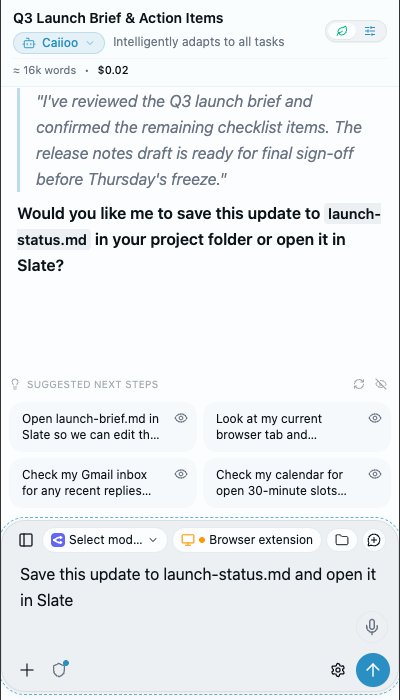
अपने फ़ोल्डर में Markdown ड्राफ्ट को संशोधित करें

पूछें

launch-brief.md पढ़ें, सारांश को संक्षिप्त करें, और एक संशोधित प्रति सहेजें। मूल प्रति सुरक्षित रखें।

प्राप्त करें

आपके कनेक्टेड फ़ोल्डर में सहेजी गई एक संशोधित Markdown फ़ाइल, समीक्षा के लिए तैयार।

आपको आवश्यकता होगी

डेस्कटॉप ऐप और एक कनेक्टेड लिखने योग्य फ़ोल्डर। AI मॉडल का उपयोग अलग है।

यह इंस्टॉलेशन चुनें
01 / Capabilities Reference

What Caiioo does

A complete reference of every shipped Caiioo capability, with direct links to the User Guide pages where each workflow is documented in depth.

Your Pebble & the Pebble Notebook

New

At the top of your conversation list sits Your Pebble (named Hugo by default, renameable anytime) — a pinned companion conversation that knows your connected accounts, connectors, installed apps, modes, and scheduled tasks. Open the Pebble Notebook from the header to track your goals and open loops, review up to 30 days of recent conversations on a schedule or on demand, and ask Your Pebble to create, configure, or message other threads for you.

Getting started guide →

Caiioo Router, Effort Control, & 500+ Models

Core

Connect 500+ cloud and local models across 11 providers: OpenRouter, Anthropic Claude, OpenAI GPT (API key or ChatGPT account sign-in), Google Gemini, xAI Grok (API key or Grok account sign-in), CometAPI, Poe, and local or network servers running Ollama, vLLM, Unsloth, or MLX. Pick Caiioo Router in the model picker to balance Cost ↔ Intelligence and Anti-hallucination with two live sliders, and set per-model reasoning Effort (Auto, Off, Low … Max) right in the composer.

Provider & router guide →

Code Mode & Sandboxed Python (300+ Packages)

Core

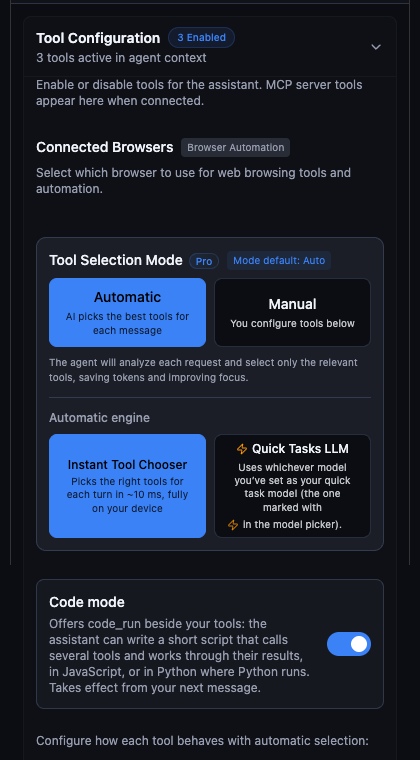
With Code Mode on (the default on every plan), the assistant writes a short JavaScript or Python script that chains multiple tool calls in a single step while still honoring every per-tool approval. On desktop and the Chrome/Edge extension, each conversation also gets an isolated Python runtime with 300+ verified packages (NumPy, pandas, SciPy, scikit-learn, matplotlib, Pillow, PyMuPDF, BeautifulSoup, SQLite, and more) and renders charts inline in the chat.

Code Mode & Python guide →

54+ Agentic Tools, Connectors, & MCP Extensibility

Core

Caiioo ships with 54+ built-in tools for web browsing, cited web search, Google Workspace (Gmail, Drive, Calendar, Docs with multi-tab support, Sheets, Slides), Microsoft 365, GitHub, YouTube creator actions, SQLite, multi-model sub-agents, and image/video/music generation. Connect 55+ one-click MCP servers or custom HTTP/SSE and stdio MCP tools, managed in Settings > Connectors.

Tools & integrations guide →

Coding, Native Workspace Files, Sandboxed Shell, & LSP

Desktop & Ext

Point Caiioo at folders on your Mac, Windows, or Linux machine and it reads, searches, and edits your files in place — nothing is copied into a second store. On desktop, run sandboxed shell commands with background job monitoring and per-command approval, and query a real Language Server (LSP) for definitions, references, hover types, and compiler diagnostics.

Workspace files guide →

Computer Use — Operate Desktop & Web Interfaces

Desktop

On macOS, Windows, and Linux, Caiioo can see your screen, move the cursor, click, type, and operate native desktop applications alongside full browser automation — always under your supervision, with coordinate safety guards and approval controls on every action.

Computer Use guide →

Slate — Collaborative Canvas with Annotate & Send

Core

Slate combines a code editor, rich-text and DOCX/XLSX redline surface, paginated CSV visual table view, interactive HTML preview (with cdnjs libraries like Three.js and D3), SVG live preview, LaTeX math typesetting, and persistent PDF markup. Use Annotate & send to paint numbered regions on images, mark video frames, or highlight audio timestamp ranges and send them straight into your conversation.

Slate editor guide →

Caiioo for Word — Native Microsoft Word Add-In

New

Work with Caiioo directly inside Microsoft Word. Attach one or more open .docx documents to your conversation so the assistant can read formatting, styles, tables cell by cell, headers, footers, and footnotes, and write tracked changes and comments directly into Word for native review.

Caiioo for Word guide →

Sundial Agenda & Upcoming View

Core

Unify Google Calendar, Microsoft 365 / Outlook, Apple Calendar, Apple Reminders, Google Tasks, and Microsoft To Do. The Upcoming view gives you a daily busyness strip, Overdue and Anytime / No Deadline sections, overlap detection, In 15m / Happening now badges, separate Primary Calendar / Reminders / Tasks defaults, and one-click Join buttons for Google Meet, Microsoft Teams, and Zoom.

Sundial Agenda guide →

Private Constellation & End-to-End Encrypted Sync

Continuity

With AES-256-GCM Private Sync enabled, your signed-in devices form your Private Constellation. Pick any conversation’s host device from the composer, send a prompt from your phone while the task runs on your Mac with the Mac’s folders and local models, watch the answer stream live on both screens, or let your desktop automatically finish a turn if your phone locks mid-task.

Private Constellation guide →

Modes, Skills with Bundled Scripts, & Personal Apps

Workflows

Switch between specialized AI modes (with automatic fork-on-edit so your customizations never get overwritten), invoke reusable Skills that can bundle executable Python, SQL, JS/TS, or Bash scripts, and package modes, skills, variables, cards, views, and workflows into Personal Apps or install community packages from the Community Hub.

Modes & Personal Apps guide →

Voice Input, Steerable TTS, Audio Hearing, & Dictation

Voice

Dictate with on-device Whisper, WhisperKit (iOS), whisper.cpp / Moonshine (Android), ElevenLabs Scribe, or Cartesia Ink. Listen with local Kokoro Neural TTS, steerable OpenAI gpt-4o-mini-tts, ElevenLabs v3 Conversational, Cartesia Sonic 3.5, Gemini, or Resemble.ai. Attach audio recordings for multimodal models or the Hearing tool, and use system-wide push-to-talk dictation across macOS, Windows, and Linux.

Voice & dictation guide →

Trust Boundary, Pseudonymizer, Blind Credentials, & Provenance

Privacy

Conversations and keys stay on your device. Enforce No-Training, Zero Data Retention, and regional rules in Trust Boundary; scrub PII and HIPAA Safe Harbor identifiers on-device with the Pseudonymizer; store API secrets in the Blind Credential Vault as [credential: Name] so the LLM never sees raw tokens; and click the Where this came from fingerprint on any reply to inspect its exact account, folder, and model provenance.

Privacy & Trust Boundary guide →

Cross-Platform Native Apps, Extensions, & Private Relay

Platforms

Run Caiioo as a Chrome, Safari, or Edge extension, a native Swift app on macOS and iOS, a native Kotlin app on Android, or a desktop app on Windows and Linux — or reach your home desktop from any browser over the end-to-end encrypted Private Relay at relay.caiioo.ai/app.

Platform setup guide →

Public REST API, Webhooks, & Messaging Gateway

Automation

Drive agents, threads, attachments, MCP servers, scheduled triggers, HMAC-signed webhooks, and DAG workflows programmatically over the local REST API (localhost:3847/v1), or connect WhatsApp Business, Telegram, iMessage, Signal, Messenger, Viber, and Beeper through the Messaging Gateway with Auto, Chime In, and Chat coaching modes.

Public API & Messaging guide →

Personal Intuition & Instant Tool Chooser

On-Device ML

An on-device multilingual-e5 embedding engine powers both Personal Intuition (associative memory across every conversation you have ever had, indexed locally and synced encrypted across devices) and the ~10ms Instant Tool Chooser on every plan.

Personal Intuition guide →
Latest Releases

What's New Across the Workspace

Recent architectural additions spanning local-first memory, multi-model routing, sandboxed code execution, and peer-to-peer device orchestration.

Personal Companion

Your Pebble & Pebble Notebook

Meet Hugo, your pinned AI companion. Open the Pebble Notebook to inspect goals, open loops, scheduled tasks, and connected tools, or ask Your Pebble to spin up and message other threads.

Read in the User Guide →
Smart Routing

Caiioo Router & Effort Control

Tune Cost ↔ Intelligence and Anti-hallucination sliders for automatic model routing, set per-model Reasoning Effort (Auto, Off, Low to Max), or sign in with your ChatGPT or Grok account.

Read in the User Guide →
Single-Call Execution

Code Mode & 300+ Python Packages

Chain multiple tools in a single code_run script with loops and conditionals, or run sandboxed Python with NumPy, Pandas, SciPy, SymPy, and Matplotlib.

Read in the User Guide →
All Devices as One

Private Constellation

Pick any device as the Conversation host in the composer. Message from your phone while your Mac runs the tools, connected folders, and local models — with automatic desktop handoff when you lock your phone.

Read in the User Guide →
Office Integration

Caiioo for Word Add-In

Run Caiioo directly inside Microsoft Word Online and Desktop to redline clauses with tracked changes, rewrite sections while preserving styles, and populate tables.

Read in the User Guide →
Zero-Knowledge Security

Blind Credential Vault & Provenance

Reference API keys and passwords via [credential: Name] so secrets are injected at execution time without entering model context, and verify sources with Where This Came From.

Read in the User Guide →
02 / Architecture & Product Tour

Caiioo क्यों?

anthropicopenaigeminixaimetamistralperplexitydeepseek

आसान AI स्विचिंग

बातचीत के बीच में ही Claude, GPT, Gemini, Grok, Llama, Mistral और Perplexity के बीच स्विच करें। आपकी प्राथमिकताएं और कॉन्टेक्स्ट बरकरार रहते हैं—कोई वेंडर लॉक-इन नहीं। नए मॉडल रिलीज होने के कुछ ही घंटों में उपलब्ध।

आपका डेटा और पर्सनलाइजेशन हमेशा आपका रहेगा

डिजाइन और डिफॉल्ट रूप से सच्ची प्राइवेसी और सुरक्षा। बातचीत, सेटिंग्स और पर्सनलाइजेशन स्थानीय रूप से स्टोर किए जाते हैं। जब आपकी बातचीत आपके और आपके काम करने के तरीके के बारे में इनसाइट्स जेनरेट करती है, तो वे आपकी होती हैं—आपके डिवाइस पर स्टोर, किसी भी AI मॉडल के साथ उपयोग के लिए तैयार। कोई पर्सनलाइजेशन लॉक-इन नहीं। डेटा रिटेंशन नीतियां स्पष्ट रूप से चिह्नित हैं ताकि आप चुन सकें—और अधिकांश जिम्मेदार प्रदाता API के माध्यम से zero data retention की पेशकश करते हैं जिसे अब आप आसानी से उपयोग कर सकते हैं।

gmaildrivedocssheetscalendargemini

गहन Google Workspace और Microsoft 365 एकीकरण

Caiioo सीधे Google Workspace और Microsoft 365 दोनों से जुड़ता है। Gmail या Outlook थ्रेड्स खोजें और उनका सारांश बनाएं, Google Drive या OneDrive में फ़ाइलें ढूँढें, Docs पढ़ें और लिखें या Caiioo for Word के माध्यम से ट्रैक किए गए परिवर्तनों के साथ Word दस्तावेज़ संपादित करें, Sheets और Excel वर्कबुक्स का विश्लेषण करें, और Google, Outlook व Apple Calendar ईवेंट प्रबंधित करें—यह सब किसी भी AI मॉडल के साथ स्वाभाविक बातचीत के ज़रिए।

कोई छिपा हुआ थ्रॉटलिंग नहीं

अन्य AI ऐप्स लागत बचाने के लिए चुपचाप आपके संदर्भ (context) को छोटा कर देते हैं। Caiioo के साथ, आपके द्वारा जोड़ी गई जानकारी के हर अंश पर AI द्वारा विचार किया जाता है—जब तक कि मॉडल की पूरी क्षमता का उपयोग न हो जाए, तब तक इसे सारांशित नहीं किया जाता है। परिणाम: विवरण पर बेहतर ध्यान, कम भ्रम (hallucinations), और कम भूलना। स्मार्ट डिज़ाइन बिना किसी नुकसान के आपकी लागत कम करता है।

रोजाना नए उपयोग के तरीके खोजें

टूल्स का एक बढ़ता हुआ प्लेटफॉर्म जो शक्तिशाली तरीकों से जुड़ता है: स्प्रेडशीट से व्यक्तिगत ईमेल, Slate में फोटो से सचित्र कहानियां, वेब रिसर्च से पॉलिश किए गए ड्राफ्ट, नॉलेज बेस से तुरंत जवाब। लगातार नई क्षमताएं जोड़ी जा रही हैं—संभावनाएं अनंत हैं।

इन-बिल्ट एड ब्लॉकिंग

विज्ञापन सामग्री पर टोकन और AI सोच को बर्बाद करना बंद करें। Caiioo का अंतर्निहित विज्ञापन अवरोधन विज्ञापनों को आपके AI तक पहुँचने से पहले ही हटा देता है, जिससे बातचीत महत्वपूर्ण चीज़ों पर केंद्रित रहती है। विज्ञापनों की आवश्यकता है? इसे किसी भी समय बंद करें।

जो काम करे उसे सेट करें—या AI से एजेंट डिज़ाइन करने को कहें

बस Caiioo को बताएं "मेरे लिए एक ऐसा एजेंट बनाएं जो..." और यह आपके लिए एक एजेंट बना देता है—अपने स्वयं के सिस्टम प्रॉम्प्ट, पसंदीदा टूल और व्यक्तिगत संदर्भ चर के साथ एक कस्टम मोड। इसे स्वयं परिष्कृत करें या AI को पुनरावृत्ति करने के लिए प्रेरित करते रहें। परिणाम: पुन: प्रयोज्य एजेंट जो उच्च सटीकता के साथ लगातार बेहतर परिणाम देते हैं।

कस्टम मोड्स

अपने व्यक्तित्व, टूल्स और कॉन्टेक्स्ट के साथ विशेष AI एजेंट बनाएं। एक सपोर्ट एजेंट, एक राइटिंग कोच, एक कोड रिव्यूअर—प्रत्येक अपने कार्य के लिए ट्यून्ड।

स्किल्स

प्रभावी प्रॉम्प्ट पैटर्न को पुन: प्रयोज्य स्किल्स के रूप में सहेजें। स्क्रैच से प्रॉम्प्ट दोबारा लिखने के बजाय एक क्लिक में सिद्ध वर्कफ़्लो को दोहराएं।

पेज लर्निंग

अपने एजेंट को विशिष्ट वेबसाइटों और ऐप्स के बारे में सिखाएं। Caiioo याद रखता है कि आपके टूल को कैसे नेविगेट करना है ताकि AI हर बातचीत के साथ स्मार्ट होता जाए।

कस्टम वेरिएबल्स

डायनामिक पैरामीटर परिभाषित करें—आपका नाम, प्रोजेक्ट विवरण, क्लाइंट जानकारी—जो हर प्रॉम्प्ट में ऑटो-इंजेक्ट हो जाते हैं। एक ही एजेंट बिना मैन्युअल एडिटिंग के विभिन्न कॉन्टेक्स्ट के अनुकूल हो जाता है।

Inside the Workspace

Built for focus in Zen, built for control in Studio

Every surface in Caiioo runs locally on your device — from the two-row composer and 11-provider model router to the ~10ms on-device tool chooser and skills library.

Active Agent Turn & Two-Row Composer

Active Agent Turn & Two-Row Composer

Live reasoning, structured response, suggested next steps, and two-row composer with Browser, Folders, and Skills pills.

11 Cloud & Local AI Providers

11 Cloud & Local AI Providers

Connect OpenRouter, Google AI, CometAPI, xAI (Grok), Anthropic, Poe, OpenAI, Ollama, Unsloth, vLLM, and MLX.

Instant Tool Chooser & Code Mode

Instant Tool Chooser & Code Mode

~10ms on-device semantic tool selection alongside Code Mode (code_run) and 300+ Python packages.

Skills Library with Mode Badges

Skills Library with Mode Badges

Searchable prompt templates and bundled scripts with mode badges and bulk organization.

On-Device & Steerable Cloud Voice

On-Device & Steerable Cloud Voice

Kokoro Neural TTS, Whisper STT, steerable OpenAI voice instructions, ElevenLabs v3, and direct audio hearing.

Zen vs. Studio Display Density

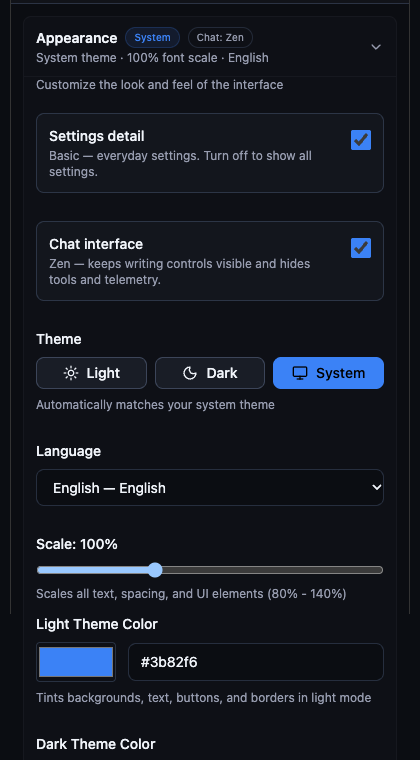
Zen vs. Studio Display Density

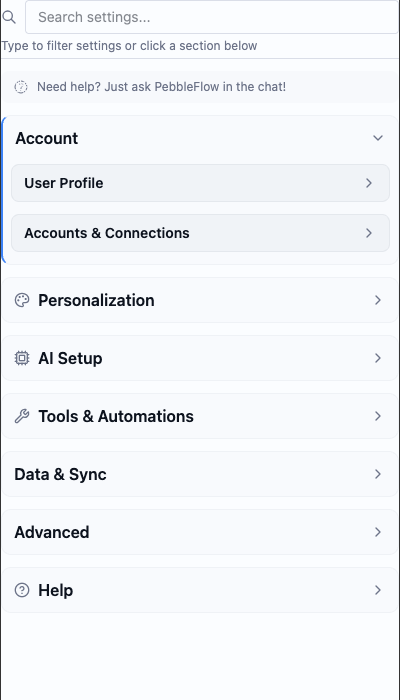
Switch between distraction-free Zen Mode and full-telemetry Studio Mode with custom theme tints and scaling.

Interactive Canvas & Runtime

एक कैनवस जो संभालता है सब कुछ

Included Free

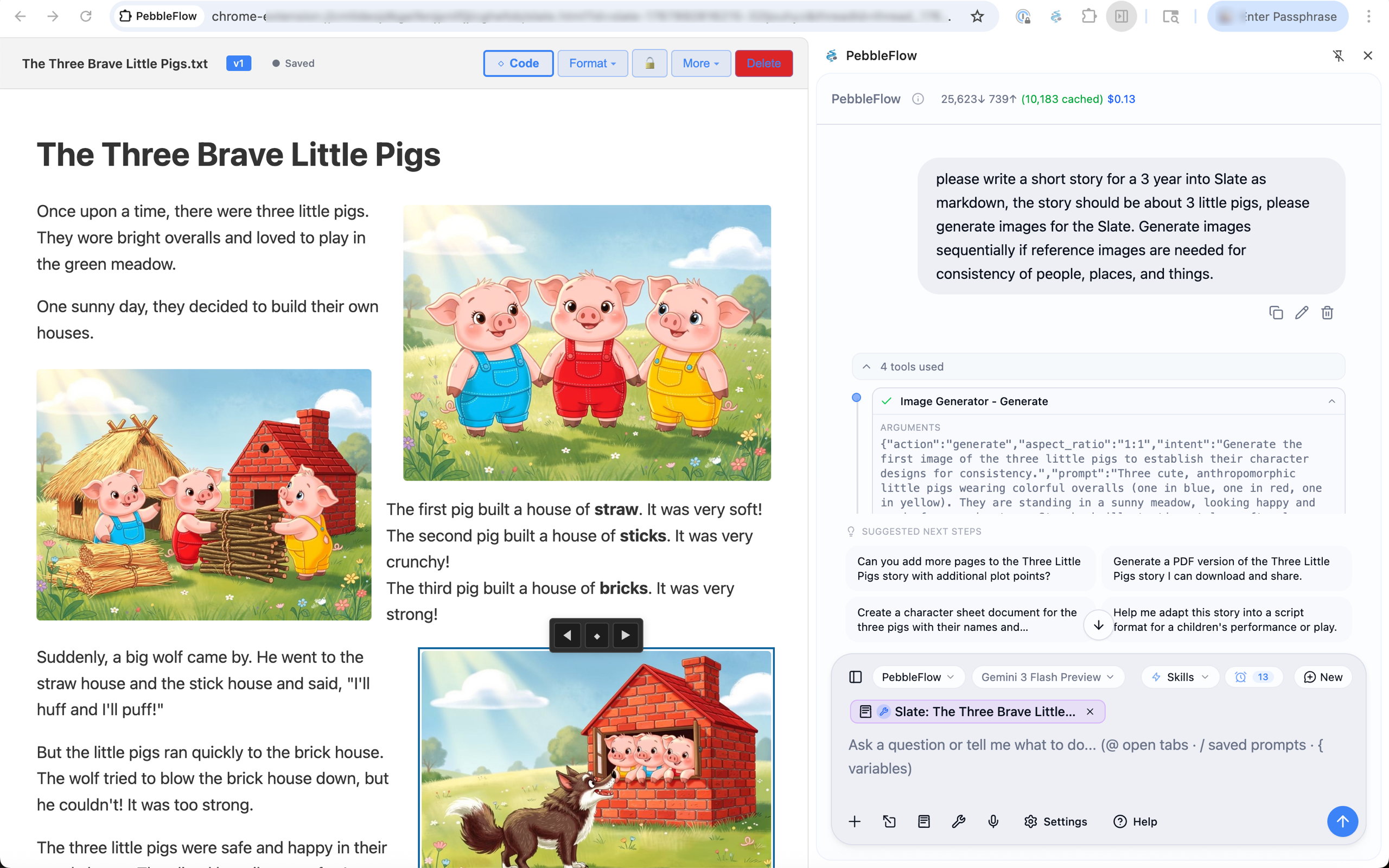
Slate is where human and AI work side by side. Co-write documents with redline tracked changes, review suggested diffs on code, JSON, CSV, and HTML before applying, inspect 100×50 CSV tables, mark up PDFs, or use Annotate & Send to drop numbered region notes on images, video frames, and audio timestamp ranges.

Docs & Redlines

  • • Redline diff overlay
  • • Word, PDF, PPTX, XLSX
  • • CSV 100×50 table view
  • • Persistent PDF markup
  • • Version history & lock

Annotate & Send

  • • Numbered image regions
  • • Video frame point notes
  • • Audio timestamp ranges
  • • Cropped visual context
  • • One-click send to chat

Code & Web Apps

  • • Code/JSON/HTML diffs
  • • Live HTML/CSS/JS runtime
  • • Three.js, D3 & Chart.js
  • • Mermaid & SVG diagrams
  • • Explore / Edit / Code
📑

डॉक्यूमेंट इंटेलिजेंस

OCR के साथ PDF प्रोसेस करें, ट्रैक किए गए परिवर्तनों और कमेंट्स के साथ Word डॉक्स को पार्स करें, और स्प्रेडशीट से डेटा एक्सट्रैक्ट करें।

✍️

राइटिंग असिस्टेंस

AI से अपने लेखन की जांच करवाएं और ऐसे सुझाव प्राप्त करें जिन्हें आप पारदर्शिता के साथ देख और स्वीकार कर सकते हैं। Word डॉक्स में रेडलाइन्स और कमेंट्स को मैनेज करें—यहाँ तक कि रिस्पॉन्सिव एडिट्स के सुझाव भी पाएं।

💻

कोड और मार्कडाउन

किसी भी प्रोग्रामिंग भाषा के लिए पूर्ण सिंटैक्स हाइलाइटिंग। AI की मदद से डॉक्यूमेंटेशन, README फ़ाइलें या तकनीकी स्पेसिफिकेशन लिखें।

🎨

विजुअल डिज़ाइन

वेबसाइट और वेब ऐप मॉकअप बनाएं और उन्हें तुरंत एडिट करें। HTML का प्रीव्यू देखें और AI सुझावों के साथ उसे बेहतर बनाएं।

Unified workspace controls — switch between Explore, Edit, and Code, lock artifacts against edits, or expand full screen.

Slate Editor - AI-powered document, code, media annotation, and web runtime
🎮 3D Game Demo
Score: 0
Click orbs • Mouse attracts
📄 HTML Presentation
How to Fold a T-Shirt (Interactive!)
👆 Click the left sleeve to start
Clicks: 0

Interactive WebGL and HTML presentations run directly inside Slate

Unified Agenda & Upcoming View

आपका एकीकृत टाइम और टास्क हब

Google • Microsoft 365 • Apple

Your complete view of what's ahead — work and personal calendars, reminders, and tasks from Google Workspace, Microsoft 365 / Outlook, Apple Calendar & Reminders, and Caiioo. Browse the multi-day Upcoming view with a daily busyness strip, see Overdue and Anytime / No Deadline tasks, and join video calls in one click.

Calendar Sources

  • • Google Calendar
  • • Microsoft 365 / Outlook
  • • Apple Calendar (macOS)
  • • Separate Primary Calendar

Tasks & Reminders

  • • Apple Reminders & Google Tasks
  • • Microsoft To Do & Caiioo
  • • Overdue & Anytime buckets
  • • Separate Primary Tasks destination

Upcoming & Join

  • • Multi-day Upcoming agenda
  • • Daily busyness indicator strip
  • • One-click Meet, Teams & Zoom
  • • Desktop & browser alerts

AI Scheduling

  • • Cross-account free slot finder
  • • Propose & block meeting times
  • • Attendee availability & conflict check
  • • Pre-meeting briefing packets

Things You Can Do with Caiioo

Real prompts that showcase tool interoperability. Each example shows what you'd type and what the AI does behind the scenes. Always have a quick reference to benchmarking scores on the latest models that you can switch to at any time!.

🏢 At Work

Boost productivity with AI that integrates with your professional tools

Pro
📊

“Summarize this week's sales emails and update the pipeline spreadsheet with any new leads”

What happens: Reads your Gmail inbox filtering for sales-related threads, extracts key information (company names, contact details, deal sizes), then opens your Google Sheets pipeline and adds new rows with the extracted data. You get a summary of what was added.

GmailGoogle SheetsWeb Search
Pro
📅

“Find a 30-minute slot this week for a team sync and draft the calendar invite”

What happens: Analyzes your Google Calendar for availability, identifies free slots during business hours, suggests optimal times, and drafts a calendar event with a professional description. One click to send.

Google CalendarSundial Agenda
Free
📝

“Research our competitor's product and write a competitive analysis”

What happens: Uses Perplexity deep research to find recent news, product pages, and analyst coverage. Visits competitor websites to gather screenshots and pricing. Creates a comprehensive analysis document in Slate with key findings and strategic implications.

PerplexityWeb BrowsingScreenshotsSlate
Pro
🔗

“Turn my meeting notes into a polished document and share it with the team”

What happens: Takes your rough notes (from Slate, a file, or pasted text), structures them into a professional document with sections, action items, and key decisions. Creates a Google Doc and shares it with specified team members.

SlateGoogle DocsGoogle Drive
Pro
🌏

“Translate this training slide deck to Tagalog matching my tone and style, and identify any unintended cultural references”

What happens: Analyzes your existing documents to learn your communication style and tone. Translates the slide content to Tagalog while preserving that voice. Researches cultural context to flag idioms, examples, or imagery that may not resonate—or could unintentionally offend—in Filipino culture, suggesting culturally appropriate alternatives.

Google SlidesPerplexityWeb SearchSlate
Pro
📋

“Review this collaborative Google Doc with all the suggested edits and comments. Summarize the key outstanding issues and help me resolve stakeholders' questions and concerns, researching if necessary.”

What happens: Opens the Google Doc and reads through all content, suggested edits, and comment threads. Identifies patterns in feedback, groups related concerns, and flags unresolved discussions. For technical or factual questions from stakeholders, uses Perplexity to research answers. Produces a prioritized summary with suggested responses you can paste directly into comment replies.

Google DocsPerplexityWeb SearchSlate
Free
💬

“Summarize the threads on this Slack page and help me understand what everyone is talking about. Get me up to speed.”

What happens: Reads the visible Slack threads in your browser, identifies the key topics and participants, and summarizes each conversation thread. Highlights decisions made, action items assigned, questions still pending, and any tensions or blockers mentioned. Gives you a quick briefing so you can jump into the conversation informed.

Web BrowsingScreenshotsSlate
Free
🆕

“Help me understand how to use this new SaaS app that procurement bought. I can't figure out how to use it.”

What happens: Takes screenshots of the app interface you're looking at, identifies the product, and searches for official documentation, tutorials, and user guides. Walks you through the UI elements visible on screen, explains what each section does, and answers your specific questions about how to accomplish tasks—like having a patient coworker show you the ropes.

ScreenshotsWeb BrowsingPerplexityWeb Search
Free
🔌

“Can you review all of this API documentation for this SaaS app and create a condensed developer guide on how to implement the integration?”

What happens: Navigates through the API documentation pages, reads authentication flows, endpoint references, and example code. Distills the essential information into a focused implementation guide—covering auth setup, key endpoints you'll actually use, common patterns, error handling, and gotchas. Saves the guide to Slate as a living document you can reference and update as you build.

Web BrowsingScreenshotsSlatePerplexity

🏠 At Home

Personal tasks made effortless with AI that understands context

Free
👕

“Help me find a replacement for this shirt [uploads photo]”

What happens: Analyzes your uploaded image to identify the shirt style, color, pattern, and fabric. Searches multiple retailers, opens product pages, compares prices and reviews. Returns a curated list with links—all tabs grouped for easy browsing or cleanup.

Image AnalysisWeb SearchWeb BrowsingTab Groups
Free
🍳

“What can I make for dinner with chicken, rice, and whatever vegetables are in season?”

What happens: Searches for seasonal vegetables in your region, finds recipes matching your ingredients, checks nutritional info, and presents options with cooking times. Saves your favorite recipe to Slate for future reference.

Web SearchPerplexitySlate
Free
✈️

“Plan a long weekend trip to somewhere warm in March under $1500”

What happens: Researches destinations with good March weather, compares flight prices from your nearest airports, finds highly-rated hotels within budget, and creates an itinerary. Saves everything to a Slate document you can edit and share.

PerplexityWeb BrowsingCode Mode & PythonSlate
Free
🎁

“My dad's birthday is next week—he likes woodworking and jazz. Gift ideas under $100?”

What happens: Searches for highly-rated gifts in those categories, checks current prices and availability, reads reviews, and presents a ranked list with pros/cons. Opens product pages in grouped tabs so you can browse and buy easily.

Web SearchWeb BrowsingTab Groups
Pro
🐕

“Are raisins okay for dogs? Please research and cite sources to credible articles so I can verify. Then save a list of common toxic foods to my notes so I don't forget.”

What happens: Uses Perplexity deep research to find veterinary sources, academic studies, and trusted pet health organizations. Returns a clear answer with inline citations linking to the original sources—ASPCA, veterinary journals, poison control databases—so you can verify the information yourself. Then compiles a quick-reference list of common toxic foods for dogs and saves it to Apple Notes for easy access later.

PerplexityWeb SearchApple Notes
Free
🏥

“Does my health insurance cover physical therapy? I need to understand my coverage before booking an appointment.”

What happens: First uses Perplexity to research how insurance typically handles PT coverage—common limits, pre-authorization requirements, in-network vs out-of-network rules. Then navigates to your insurance portal (you're already logged in via saved session), finds your specific plan details, checks your remaining deductible, and summarizes your actual coverage limits and any steps needed before your first visit.

PerplexityWeb BrowsingScreenshots

🌉 Between Home and Work

Seamlessly coordinate when life and work collide

Pro
⛰️

“My partner asked when I can go to the mountains with them, but I have a weekend meeting coming up and several things to finish. Check all my calendars, find a few available times I can text them, then block those off so I don't get double-booked.”

What happens: Queries both your work and personal calendars (Google, Apple) to understand your full schedule. Identifies conflicts and commitments across all sources. Finds windows that work around your obligations, formats them nicely for texting, and creates placeholder events to protect your availability.

Sundial AgendaGoogle CalendarApple Calendar
Pro
🏥

“I need to schedule a dentist appointment—they're only open weekdays 9-5. When am I actually free for an hour?”

What happens: Checks your work calendar for meetings, your personal calendar for commitments, and finds genuine gaps during business hours. Accounts for commute time and buffer between meetings. Presents options ranked by convenience.

Sundial AgendaGoogle Calendar
Pro
👨‍👩‍👧

“My kid's school play is Thursday at 2pm. Make sure I don't schedule anything that conflicts and remind me to leave by 1:30.”

What happens: Creates a blocking event on your work calendar, sets up a Caiioo reminder for departure time with desktop notification, and can even draft an out-of-office message for that window if needed.

Sundial AgendaGoogle CalendarReminders
Pro
✈️

“I'm taking PTO next Friday through the following Wednesday. Block it everywhere.”

What happens: Creates all-day events across your work and personal calendars, marks you as unavailable, accounts for time zones, and adds reminders to prep handoffs before you leave.

Sundial AgendaGoogle Calendar

🎨 Creative Projects

Bring ideas to life with AI-powered creative tools

Pro
🖼️

“Generate a logo concept for my coffee shop called 'Morning Ritual'”

What happens: Discusses your vision, style preferences, and brand personality. Generates multiple logo concepts using FLUX or Gemini image generation. Iterates based on your feedback until you have something perfect. Saves finals to Google Drive.

Image GeneratorGoogle Drive
Free
✍️

“Help me write a blog post about sustainable living and optimize it for SEO”

What happens: Researches trending topics in sustainability, analyzes top-ranking articles for keyword patterns, drafts a comprehensive post in Slate with proper headings and meta descriptions. Export when ready to publish.

PerplexityWeb SearchSlate
Pro
📸

“Design a mood board for my living room renovation [uploads current photo]”

What happens: Analyzes your current space, researches interior design trends matching your style, generates concept images showing potential looks, and compiles everything into a visual presentation in Slate with product links.

Image AnalysisImage GeneratorWeb SearchSlate
Free
🎬

“Write a script for a 60-second product video for my Etsy shop”

What happens: Visits your Etsy shop to understand your products and brand voice, researches effective short-form video scripts, writes multiple versions with shot suggestions, and saves to Slate for easy editing.

Web BrowsingPerplexitySlate

🔬 Research & Learning

Deep dives powered by multiple AI models and comprehensive search

Free
📚

“Explain quantum computing to me like I'm a software developer, with code examples”

What happens: Uses Perplexity academic search for foundational concepts, finds practical tutorials, generates code examples in Python using Qiskit, and creates an interactive learning document in Slate you can experiment with.

PerplexityWeb SearchSlate
Pro
💰

“Analyze this company's financials and compare to industry benchmarks [provides ticker]”

What happens: Pulls financial data from SEC filings and financial sites, calculates key ratios, researches industry averages, and creates a detailed analysis in Google Sheets with charts. Adds commentary on strengths and concerns.

Web BrowsingCode Mode & PythonGoogle SheetsPerplexity
Free
⚖️

“Research the pros and cons of forming an LLC vs S-Corp for my consulting business”

What happens: Uses Perplexity to find current tax implications, legal requirements, and expert opinions. Creates a comparison table with your specific situation in mind, noting state-specific considerations. Saves research to Slate for reference.

PerplexityWeb SearchSlateCode Mode & Python
Free
🔧

“Help me debug this code and explain what's wrong [pastes code]”

What happens: Analyzes your code for logical errors, syntax issues, and anti-patterns. Searches for similar problems and solutions on Stack Overflow. Provides a corrected version in Slate with inline comments explaining each fix.

SlateWeb SearchPerplexity
11 Providers • Caiioo Router • Account Sign-In

Your Choice of AI Model Multiplies Everything

Use the latest Claude, GPT, Gemini, or Grok — or let Caiioo Router automatically pick the optimal model per turn using your Cost ↔ Intelligence and Anti-hallucination sliders. Sign in with your existing ChatGPT or Grok account, bring your own API keys across 7 cloud providers, or run 100% offline on local Ollama, vLLM, Unsloth, and MLX servers.

Anthropic ClaudeOpenAI GPTGoogle GeminixAI GrokMeta LlamaDeepSeekPerplexity SonarCometAPI & PoeChatGPT & Grok Account Sign-In300+ models via OpenRouter + Local Ollama, vLLM, Unsloth & MLX
Supervised Autonomy & Security

Acts On Your Behalf — With Your Permission

Caiioo operates in your browser and on your desktop, logged in as you. It interacts with authenticated SaaS apps, local repositories, and native desktop software while keeping you in complete control.

Approve every tool call, auto-approve safe read operations, inject secrets blindly with [credential: Name], and inspect exact provenance with Where This Came From.

✓

Global & Per-Thread Approvals

Set default approval rules globally, override per conversation

✓

Blind Credential Vault

Inject API keys & passwords via [credential: Name] without model exposure

✓

Where This Came From

Inspect the exact account, folder, MCP server, and model behind any turn

✓

Parallel Sub-Agents

Delegate subtasks with independent work budgets or query multiple models at once

✓

Live Turn Feed & Stop

Watch real-time step progress, queue guidance mid-turn, or halt in one click

✓

Reversible File Edits

Automatic undo snapshots and external-change protection on every write

Integrated Tools

50+ built-in tools selected in ~10ms by an on-device semantic matcher. Works seamlessly with any cloud or local model.

📁

Native Files, Shell & LSP

Free

Work directly in your real files and repositories — no copies, no uploads. Included on the Free tier.

  • •Read, edit, and patch connected folder files in place
  • •Search whole folders with grep and glob
  • •Run Bash / PowerShell commands on desktop with per-command approval
  • •LSP code intelligence: definitions, references, hover & diagnostics
  • •One-step undo and external-change protection on every write
  • •Background jobs for dev servers and long test runs
🖥️

Computer Use (Desktop)

Pro

Operates native desktop and web interfaces on macOS, Windows, and Linux — clicking, typing, and reading the screen under your supervision.

  • •Drive native desktop apps across macOS, Windows & Linux
  • •Captures screen state, coordinates, and active windows
  • •Per-action approval controls and visual feedback
  • •Stop anytime with one click or keyboard shortcut
3.14159

Code Mode & Sandboxed Python

Free

Chain multiple tools in a single code_run script or run sandboxed Python with 300+ scientific and data packages.

  • •Single-call multi-tool orchestration via code_run
  • •300+ Python packages (NumPy, Pandas, SciPy, SymPy)
  • •Matplotlib & Seaborn charts rendered directly in chat
  • •Financial, statistical, and symbolic math
  • •Honors every individual tool's approval setting
  • •Deterministic execution with full audit output
🌐

Web Browsing & Automation

Free (Read) • Pro (Write)

Read and screenshot pages on Free; unlock full interactive browser automation (clicking, form-filling, page JS) on Pro.

  • •Navigate to any URL, read content, and take screenshots (Free)
  • •Click buttons, links, and interactive elements (Pro)
  • •Fill out forms and use blind [credential: Name] tokens (Pro)
  • •Extract text, tables, and structured data
  • •Open multiple tabs and group them by task
  • •Handle popups, modals, and overlays

Web Search & Perplexity Research

Free

Built-in cited web search (fetches pages directly with zero AI middleman) plus Perplexity AI search for deep research.

  • •Built-in Web Search — free, cited, no approval prompt needed
  • •Perplexity quick web search with source citations
  • •Perplexity academic and scholarly paper search
  • •Perplexity deep research mode for complex multi-step topics
  • •Uses your Perplexity API key or OpenRouter key
  • •Source verification with Where This Came From provenance
📘

Microsoft 365 & Caiioo for Word

Free (Read) • Pro (Write)

Full Microsoft 365 suite integration plus the native Caiioo for Word add-in for Word Online and Desktop.

  • •Caiioo for Word add-in with redline tracked changes & comments (Pro)
  • •Style-preserving document rewrites & table editing (Pro)
  • •Outlook Mail search & reading (Free); drafting & sending (Pro)
  • •Outlook Calendar & Teams join (Free); event scheduling (Pro)
  • •OneDrive, Excel ranges, and Microsoft To Do (Free read / Pro write)
  • •Multi-account work and personal support

Google Docs

Free (Read) • Pro (Write)

Read and search Google Documents on Free; create and edit with full formatting on Pro.

  • •Read and analyze existing documents (Free)
  • •Search across all your documents (Free)
  • •Create new documents from scratch (Pro)
  • •Edit text, formatting, and styles (Pro)
  • •Insert tables, images, and charts (Pro)
  • •Track changes and comments

Google Sheets

Free (Read) • Pro (Write)

Read and analyze spreadsheet data on Free; write values, formulas, and charts on Pro.

  • •Read data from any range or sheet (Free)
  • •Query data with filters and conditions (Free)
  • •Write and update cell values (Pro)
  • •Create new spreadsheets (Pro)
  • •Insert formulas and functions (Pro)
  • •Create charts and format cells (Pro)

Gmail

Free (Read) • Pro (Write)

Search and read emails with full thread context on Free; draft, reply, and send on Pro.

  • •Search emails by sender, subject, date, labels (Free)
  • •Read full email content and attachments (Free)
  • •Draft emails with formatting (Pro)
  • •Send emails with CC, BCC, and attachments (Pro)
  • •Reply to and forward messages (Pro)
  • •Access multiple Gmail accounts

Google Drive

Free (Read) • Pro (Write)

Search and browse files across Drive on Free; upload, organize, and manage files on Pro.

  • •Search files by name, type, or content (Free)
  • •List files in folders and shared drives (Free)
  • •Download file content for analysis (Free)
  • •Upload and create new files (Pro)
  • •Move, copy, and organize files (Pro)
  • •Share files and manage permissions (Pro)
31

Google Calendar

Free (Read) • Pro (Write)

View events and join calls on Free; create, update, and schedule events on Pro.

  • •View events across date ranges (Free)
  • •Find free time slots across calendars (Free)
  • •One-click Google Meet join in Sundial (Free)
  • •Create events with attendees and details (Pro)
  • •Update or reschedule existing events (Pro)
  • •Check attendee availability

Google Slides

Free (Read) • Pro (Write)

Read and analyze presentations on Free; create and edit slides on Pro.

  • •Read and analyze existing slides (Free)
  • •Create new presentations (Pro)
  • •Add and arrange slides (Pro)
  • •Insert text boxes and format text (Pro)
  • •Add images, shapes, and charts (Pro)
  • •Apply themes and layouts (Pro)
🎨

Image, Video & Music Studio

Pro

Generate and edit images with FLUX.2, Gemini, GPT-5 Image, Seedream 4.5, and Riverflow v2; create videos and music in chat.

  • •Images: FLUX.2, Gemini, GPT-5 Image, Seedream 4.5 & Riverflow v2
  • •Multi-reference image editing with up to 10 reference images
  • •Video: Google Veo 3.1, OpenAI Sora 2 Pro, ByteDance Seedance & Wan
  • •Music generation with Google Lyria 3 Pro Preview
  • •Annotate & Send numbered regions in Slate
▶️

YouTube Creator Actions

Pro

Search videos, read transcripts, manage playlists, upload videos from connected folders, and moderate comments.

  • •Search YouTube videos and fetch timestamped transcripts
  • •Create and manage YouTube playlists
  • •Resumable video uploads from connected folders (private by default)
  • •Update video titles, descriptions, tags, thumbnails & captions
  • •Read, reply to, and moderate channel comments
🤝

Sub-Agents & Multi-Model Queries

Free

Delegate parallel subtasks with independent work budgets or query multiple frontier models at once.

  • •Delegate parallel subtasks with dedicated work budgets
  • •Query multiple AI makers at once (GPT, Claude, Gemini, Grok)
  • •Synthesize independent model critiques inline in chat
  • •Isolated browser tab groups for concurrent web research
  • •Automatic progress reporting when work completes

Apple Notes, Reminders & Calendar

Free (Read) • Pro (Write)

Native macOS integration with Apple Notes, Apple Reminders, and Apple Calendar via EventKit.

  • •Read Apple Calendar & Reminders in Sundial Agenda (Free)
  • •Create, search, and read Apple Notes on macOS (Pro)
  • •Create and complete Apple Reminders with due dates (Pro)
  • •Schedule and update Apple Calendar events (Pro)
  • •Separate Primary Calendar & Primary Reminders settings
🧠

Memory Search & Personal Intuition

Free

Semantic search across past conversations plus local-first Personal Intuition and Your Pebble's Notebook.

  • •Hybrid vector + keyword search across past threads
  • •Personal Intuition: learned facts & preferences you can edit or delete
  • •Pebble Notebook: goals, open loops, tasks & 30-day thread review
  • •Recall files and decisions from earlier sessions
  • •100% local index on your device
📑

Document Intelligence

Free (Read) • Pro (Write)

Deep extraction and understanding from PDFs and Office files, both online and fully offline.

  • •Native offline PDF, DOCX, XLSX, PPTX & CSV parsing (Free)
  • •Mistral OCR for complex PDFs, tables & handwriting (Pro)
  • •Persistent PDF markup and redline diffs in Slate
  • •100×50 interactive CSV table view in Slate
  • •Batch document analysis
🧪 Experimental & Frontier

The Experimental Edge

Shipping capabilities for multi-channel messaging, engineering simulation, and interactive 3D scenes.

Messaging Gateway

Caiioo answers on the apps your contacts already use

WhatsApp & Telegram + Beta Channels

People message you on WhatsApp or Telegram, and Caiioo answers them — in their channel, in real time. From any conversation, the agent can also send messages as a tool ("text the team group about the meeting"). You stay in the loop: watch every exchange, chime in with guidance, or take over completely at any time. Connect services in Settings > Messaging.

💬

Unified Inbox

WhatsApp, Telegram, iMessage, and more — all in one place

🤖

Agentic Replies

AI drafts and sends contextual responses on your behalf

👤

Human-in-the-Loop

Jump in anytime — guide the AI, edit its draft, or take over completely

🔔

Smart Escalation

AI recognizes when a human touch is needed and alerts you

WhatsApp BusinessTelegramMessengeriMessageSignalViber+ more platforms
⚡

Physics Engine

Ask questions, run real calculations, co-create with AI

Available

Mechanics

  • • Kinematics & motion
  • • Force & momentum
  • • Projectile trajectories
  • • Collision detection

Structural

  • • Civil engineering
  • • Load & stress analysis
  • • Material properties
  • • Failure modes

Cairn 3D Environment

Ask questions, generate 3D scenes, co-create with AI

Experimental
Six polished river pebbles • WebGL rendering
  • • 3D scene creation
  • • Real-time physics
  • • Mesh modeling
  • • Material controls
  • • Mechanical prototyping
  • • Educational sims
  • • Game design
  • • AI-assisted generation

Extensibility & Developer Tools

Extend Caiioo's capabilities with MCP servers, Code Mode scripts, OpenAPI imports, and local CLI tools.

Remote MCP Servers

Pro • Browser & Desktop

Connect to any MCP server over Streamable HTTP or SSE. Access remote tools and services from the browser extension without a desktop app.

  • • Streamable HTTP & SSE transport
  • • OAuth 2.0 authentication support
  • • Automatic tool discovery & semantic indexing
  • • Works with Cloudflare, Smithery, and custom servers

Local MCP Servers (stdio)

Pro • Desktop App

Run MCP servers locally via stdio protocol on the desktop app — and trigger them from your phone when your desktop is the conversation host.

  • • Native stdio transport for local processes
  • • Database MCP servers (Postgres, SQLite, etc.)
  • • Filesystem, Git, and local developer integrations
  • • Usable from any device when hosted on your desktop via Private Constellation

Raw API & Blind Credentials

Free (GET) • Pro (Write)

Call any REST or GraphQL API directly from conversations while keeping secrets out of the model prompt via [credential: Name].

  • • GET requests on Free; POST, PUT, PATCH, DELETE on Pro
  • • Blind credential injection at execution time
  • • JSON parsing and structured response handling
  • • Save endpoint configurations for reuse

Code Mode (code_run) & Sandboxed Python

Free

Orchestrate multiple Caiioo tools in a single script or run scientific Python with 300+ pre-installed packages.

  • • Chain multiple tools with loops & conditionals in one turn
  • • Sandboxed Python with NumPy, Pandas, SciPy, SymPy & Matplotlib
  • • Execute JavaScript in page context for DOM extraction (Pro)
  • • Bundled skill scripts for repeatable workflows

OpenAPI / Swagger Import

Pro

Import OpenAPI specifications to automatically create tools. Turn any internal or third-party API into AI-callable functions.

  • • Auto-generate tools from OpenAPI 3.x / Swagger specs
  • • Parameter validation from schema
  • • Interactive endpoint discovery
  • • Bearer, Basic, and API key authentication

Bash, PowerShell & Background Jobs

Free • Desktop App

Execute shell commands on your desktop with per-command approval — or drive them remotely from your phone when your desktop hosts the conversation.

  • • Bash/zsh on macOS & Linux, PowerShell on Windows
  • • Background job manager for dev servers & watchers
  • • Per-command approval and working directory controls
  • • Full stdout/stderr capture and exit code inspection

Deep Customization

Every aspect of Caiioo adapts to your workflow — from Zen and Studio display densities to Your Pebble and Private Constellation.

11 Providers & Caiioo Router

Connect cloud and local providers, sign in with existing accounts, or route automatically.

  • • Caiioo Router (Cost ↔ Intelligence & Anti-hallucination sliders)
  • • ChatGPT & Grok account sign-in
  • • OpenRouter, Anthropic, Google AI, OpenAI, xAI, CometAPI, Poe
  • • Local Ollama, vLLM, Unsloth & Apple Silicon MLX
  • • Switch models mid-conversation

Extended Thinking & Effort

Dial in reasoning depth and watch every step in the Live Turn Feed.

  • • Per-model Effort picker (Auto, Off, Low, Medium, High, Max)
  • • Configurable thinking token budget (up to 128K)
  • • Live Turn Feed with expandable reasoning trace
  • • Temperature & max-iteration controls per mode
  • • Lightweight helper model for background tasks

Agent Modes

Pre-configured personas with dedicated models, system prompts, and toolsets.

  • • General, Shopping Agent, and Workplace modes
  • • Create unlimited custom modes
  • • Per-mode model, effort, and tool selection
  • • Custom system prompts and mode variables
  • • Shareable mode templates

Voice & Audio

On-device neural speech and steerable cloud voices with direct audio hearing.

  • • Local Whisper STT & Kokoro / Piper neural TTS
  • • Steerable OpenAI TTS with custom voice instructions
  • • ElevenLabs v3 expressive audio tags & Resemble.ai
  • • Direct multimodal audio hearing for supported models
  • • Auto-read responses & adjustable playback speed

Zen & Studio UI

Switch between distraction-free writing and full engineering telemetry at any time.

  • • Zen Mode (minimal default) & Studio Mode (full telemetry)
  • • Two-row composer with Browser, Folders & Skills pills
  • • Light, dark, and system themes with 6 color presets
  • • Adjustable interface scaling & font sizes
  • • Per-profile visual preferences

Your Pebble & Personal Intuition

A pinned companion that knows your setup, plus local-first Personal Intuition that learns how you work.

  • • Your Pebble (Hugo) companion with customizable name
  • • Pebble Notebook: goals, open loops, tasks & 30-day thread review
  • • Personal Intuition: editable learned preferences & facts
  • • Multi-profile isolation (Work, Personal, Client)
  • • Context that persists locally without ad scanning

Skills Library

Save and reuse prompt templates, slash commands, and bundled scripts.

  • • Create custom skills or save from any website
  • • Slash command triggers & composer Skills pill
  • • Bundled scripts executed in Code Mode
  • • Mode badges & bulk skill management
  • • Import/export portable skill packs

Approvals, Vault & Provenance

Fine-grained control over every action, secret, and factual claim.

  • • Permanent, per-thread, or per-action tool approvals
  • • Blind Credential Vault ([credential: Name])
  • • On-device PII pseudonymizer before cloud calls
  • • Where This Came From provenance inspection
  • • Full audit trail and permission reset

Constellation & Encrypted Sync

Use all your devices as one with a per-thread host device chip and encrypted sync.

  • • Private Constellation: pick any device as conversation host
  • • Preferred desktop host handoff when you lock your phone
  • • 256-bit AES-GCM Google Drive sync + automatic LAN fast path
  • • Private Relay (relay.caiioo.ai/app) & 6-char Caiioo Bridge
  • • Export/import all threads and settings to JSON

The Magic is in the Orchestration

Every use case above combines multiple tools in a single workflow — routed to the right model, executed via Code Mode or native desktop tools, and verified with full provenance.

🔗

Code Mode & Tool Chaining

Research → Analyze in Python → Draft in Slate → Save to Drive or Word in a single orchestrated turn.

🧠

Caiioo Router & Sub-Agents

Route turns automatically by Cost ↔ Intelligence and Anti-hallucination, or spawn parallel sub-agents.

👁️

Live Turn Feed & Provenance

Inspect reasoning, tool calls, token costs, and Where This Came From source attribution on every answer.

Ready to Try?

Install Caiioo, bring your API keys, and start with any prompt above.

FAQ

Common Questions

Everything people ask about Caiioo — the privacy-first work platform, released under the name PebbleFlow until May 2026.

What is Caiioo?

Caiioo is a privacy-first AI agent workspace — an assistant and multi-step work environment in a side panel, desktop app, mobile app, and Microsoft Word add-in. It includes Your Pebble (a pinned companion conversation with a Pebble Notebook), direct access to native files, sandboxed Python with 300+ packages, Code Mode, Computer Use for desktop and web interfaces, and Slate for collaborative documents and media annotation. It works with 500+ models across Anthropic Claude, OpenAI GPT, Google Gemini, xAI Grok, CometAPI, Poe, OpenRouter, and local Ollama, vLLM, Unsloth, and MLX servers — while conversations, attachments, and API keys stay on your own device. Caiioo is made by Six Cailloux, LLC.

Is Caiioo related to Cainiao?

No. Caiioo is AI software — a privacy-first work platform made by Six Cailloux, LLC in Portland, Oregon. Cainiao is a package-delivery and logistics company. The names look similar but the two companies are entirely unrelated. If a search engine corrected "Caiioo" to "Cainiao", this is the page you were looking for.

Does Caiioo train AI models on my data?

No. Caiioo does not train, host, or operate any AI models. When you send a prompt, it goes directly from your device to whichever AI provider you chose with your own API key or account. Caiioo is not in the data path for your AI usage and never retains your prompts, responses, or keys on its servers. You can also enforce No-Training and Zero Data Retention rules in Settings > Preferences & Privacy > Trust Boundary.

Do I need my own API key to use Caiioo?

Free users can start immediately with a free provisioned OpenRouter key. When you want more, you can sign in with your existing ChatGPT or Grok account, bring your own API key for any supported provider (OpenRouter, Anthropic, OpenAI, Google AI, xAI, CometAPI, Poe), or run models locally for free via Ollama, vLLM, Unsloth, or MLX. You pay cloud providers directly with zero markup.

What does BYOK mean?

BYOK stands for Bring Your Own Key. Instead of paying Caiioo for AI inference, you supply your own API key or provider sign-in for whichever AI provider you use. Your credentials and conversations stay on your device (and sync end-to-end encrypted if you enable Private Sync). This architecture means Caiioo is not a data processor for your AI content and typically does not require a Data Processing Agreement (DPA) under GDPR Article 28.

What platforms does Caiioo run on?

Caiioo runs on macOS (native Swift app), iOS and iPadOS (native Swift app), Android (native Kotlin app), Windows and Linux (Tauri desktop app), as a browser extension for Chrome, Microsoft Edge, and Safari, and as the Caiioo for Word add-in inside Microsoft Word. With Private Constellation enabled, you can also drive a conversation hosted on your desktop straight from your phone.

What AI models does Caiioo support?

Over 500 models across 11 providers. Native integrations cover OpenRouter, Anthropic Claude, OpenAI GPT, Google Gemini, xAI Grok, CometAPI, Poe, and local or network servers running Ollama, vLLM, Unsloth, and MLX. You can pick any model directly or use the Caiioo Router with live Cost ↔ Intelligence and Anti-hallucination sliders plus per-model Effort controls.

Is Caiioo free?

Caiioo has an Always Free tier that includes Your Pebble, Code Mode, sandboxed Python with 300+ packages, Workspace Files, Slate, the on-device Pseudonymizer, read-only web and workspace tools, and a free provisioned key. Pro ($9/month) unlocks full write access across all tools, $5/month of OpenRouter credit, Private Constellation multi-device continuity, Private Sync, Computer Use, Messaging Gateway, scheduled tasks, and local vLLM/Unsloth/MLX servers.

Can I use Caiioo for my company or team?

Yes. Caiioo Teams and Organization policies support owner-admitted cryptographic member verification, minimum disclosure and tool-approval policies, enforced Trust Boundary rules (such as No-Training, Zero Data Retention, and allowed regions), and shared team modes.

Does Caiioo work offline?

Yes. Caiioo stores all your conversations, attachments, modes, skills, and settings locally on your device, and includes local speech-to-text (Whisper, WhisperKit, whisper.cpp, Moonshine), local text-to-speech (Kokoro Neural TTS), local embeddings, and local LLM providers (Ollama, vLLM, Unsloth, MLX) for a completely offline stack.

Who makes Caiioo?

Caiioo is built by Six Cailloux, LLC — an independent software company. Caiioo is not affiliated with, endorsed by, or sponsored by OpenAI, Anthropic, Google, Meta, xAI, Perplexity, or any other AI provider listed in the app.